Wasco Youtube Trailer

Wasco Body

Buy from Google Play App Store Buy from iTunes App Store Buy from itch.io Store Buy from Steam Store Subscription Link for Wasco Twitter link for Wasco Reddit link for Wasco E-mail link for Wasco Presskit link for Wasco

How I share gifs of our game, Wasco, on twitter?

Recently I've been working on making some gifs for Wasco for the purpose of releasing these on twitter and other social media channels to attract prospective players. I made a challenge for myself to make one gif a day and keep at it for some weeks and see what kind of impact this will bring in terms of awareness.

A concept which was pitched to me by the smartest idea man I know, my brother. He said something along the lines of "Don't make your gifs tell public how awesome your game is. Make your gifs tell public what your game is, who your character is and so forth." On my last gif I wanted Wasco to seemingly look around and search for spare parts to fix himself in order to tell players a couple of things:

  1. Wasco is a malfunctioning robot.
  2. Wasco needs parts to repair himself.
  3. Wasco is an explorer.


(You can go here to see the .gif post. If you'd like to give me a hand you can retweet it.)

Now the interesting part lies in the things happened up to this point. Before this gif came to be, the repair bay where Wasco is looking for parts in the gif didn't have any of the rusty robots it has now. These areas were empty. I realized to tell these things the game needs to give the player, Wasco, an opportunity take these roles. Then I remembered I had a couple of robot designs that I could put together, make rusty, duplicate and turn into a dead-bot yard in the repair bay area. So I imagined this scene for the game that didn't exist yet and realized if I added this scene it would be in the spirit and vision of the game itself. All of this took about 20 minutes to make since I already made a group of offline robots earlier.

In the end my marketing acts helped me refine the game to further to fit its imagined vision. I never used marketing to help me build parts of a game before. At least not in this fashion. This really blew my mind and is the reason I wrote this blog. Long story short you can let your marketing help you shape your game in a very non-slimy manner.

Artwork Progress - Part II - Start to Finish Asset Generation

(Part I here)

Below are the rough steps I followed for making assets in Wasco. There's a always a back and forth between these steps because ideas and designs influence each other but even if we're occasionally taking a single step back, at the end of the day the progress needs to finish with us two steps ahead.

I already have all the zones, characters etc. laid out at this stage so I have a list of everything I need to do. That being said here's how I approach aforementioned items in the list.

  1. Create a design compass.
  2. Collect research and inspiration material.
  3. Make traditional rough sketches. (Pen/Pencil)
  4. Make more detailed traditional sketches. (Pen/Pencil)
  5. Convert traditional media to digital. (Photoshop)
  6. Chop up the digital media into separate bits.
  7. Import separate bits of artwork into the engine framework. (Unity3D)
  8. Start setting up the scene within the engine framework. (Unity3D)
Here are some images to help you visualizing this progress:

Scanning through the Ghost in the Shell's manga for future architecture influences. I picked designs and images I like from various resources and used them as inspiration material.


I created a design compas for this area called Recharge Bay. The compass helps make cohesive assets. Cohesive assets mean the wall, the floor, the props and all things match a unified style and feeling. This way when  you think about layout, architecture, colors etc. you will keep the art tight and monodirectional. You will also notice a mini sketch on the top right corner.


Before starting my computer and putting things together I sketch and sketch. This takes some time but once you're happy with where the sketch is going you are actually done. You almost don't need to think anymore and you can simply look at your sketch and produce the artwork.


I didn't like the walls I used in my sketch so I looked at some more comic books and decided on another wall pattern.


Voila! Here's the artwork before we chop it up and turn it into assets. Apologies for the potato quality.


Obviously there are quite a bit of steps in between but I'm short on time and I believe this post already addresses the main steps.

Until next post!


Builds, builds, builds and more BUILDS!

Many builds of Wasco...

So... we're still hard at work testing Wasco. Our polish list has lost most of its critical bugs. I've spent quite a bit of time making the menu navigations as smooth as possible. For example I spent some considerable time making sure there's no Load button when you don't have a save game and that if you erase your save file the game responds to this situation by deactivating the Load button as well. 

One doesn't usually put too much thought into these things but at the end of the day when you're polishing you're working to give your players an experience unhindered by breaking menus and buttons.

Following week we will attempt a full playthrough once again and see if we can finish the game without something breaking horribly. If this is the case then we celebrate and immediately start working on the artwork that's been missing.

Once that's done vigorous playtesting and fixing and polishing will take place and then finally the game will be...

... release ready.

A statement elusive to the ears of most game developers.

This however doesn't mean the game will be released immediately after even if we're itching to do so. It mostly means we can prepare all the presskit stuff and try to reach publishers.

Polish, polish and polish some more...

Past two days we've been playtesting Wasco which is a very exciting moment for all of us. It's really motivating to see the game come together. We did come across a lot of rough edges. Good thing was we expected them.

Here's the current polish list we have. It will seem almost complete however the list grows further we play test our game:
(I borrowed this symbolic image from here.)


Critical Polish Elements:
  1. Some of our music has been taken from an unknown source. I need to find the source of the music and make sure we can use it before releasing the game.
  2. Find and add sound effects for bumping into walls and attacking enemies.
  3. Finish setting up the initial waste area.
  4. Setup the missing two waste areas.
  5. Finish writing the flavor text for picking up items.
  6. Create and add all the props.
  7. Create the final cinematic sequence for the game.
  8. Fix the issue with resizing the font.
  9. Visit all scenes and format the hierarchy and naming of all interactable objects.
  10. Visit all item prefabs and update the scripts with necessary data.
  11. Make Wasco's sprite animate when he walks.
  12. Controls aren't as responsive as they should be. This needs fixing.
  13. Update Wasco Spredsheet on google docs.
  14. Add musician names and song titles to the credits.
  15. There’s no feedback when enemy misses.
  16. A level up the notification should be more distinct than a dialogue.
  17. Exit locations for buildings within the waste town need to be setup correctly for each building. When you exit Repair Shop you end up in front of Recharge Bay.
  18. Add a confirmation sound or message to saving, loading, erasing data and or other important selections.
  19. After the ending and reloading the game the camera stopped following the player.(Couldn’t replicate)
  20. After ending the game twice in one go the game got stuck in the second ending.
  21. Level up notification shows before the dialogue.
  22. Balance combat elements.
  23. UI in Combat is too small to read.
  24. Exclude non weapon items from attack menu.
  25. When you open the credits menu or another menu at the entrance the toggle doesn’t update the description box.


Non-critical Polish Elements:
  1. Add enemy picture to the combat.
  2. Add an ‘Are you sure?’ pop up window with options to the game for erasing data.
  3. When you change areas player’s animation will freeze for a few seconds. Smoothen this.
  4. When you pick up an item the text sags to the second line. For example for the sentence “You picked up I n t e r e s t i n g  I t e m” last letter ‘m’ may end up in the second line.


Requested Polish Elements:
  1. Items should be picked up by pressing the ‘A’ button.
  2. Buildings artwork in Wastetown is too similar to one another. Needs a type of distinction. 
  3. Starting HP is too low and I die too often.
  4. Item list too confusing, I don’t know what to attack with.


Testing UI and font sizes for multiple resolutions in Unity

Hey y'all! Just got back from a short and rejuvenating vacation in Istanbul. Let's jump right back in:

I'm still churning the previously posted list of things to polish. Today I was able to resolve an issue with the fonts being too small to read. I added a FontManager.cs that retains references regarding all Text components and updates the font size with respect to the device resolution.

I'm using a Unity package called xARM and I %200 recommend it to everyone who's aiming to release their project on multiple platforms or platforms that come with multiple resolutions. It makes testing for variuos resolutions a piece of cake. You can check it out below. (To be clear I've been using their package for a while and I don't even know the guy or guys behind it. Just sharing a tool I like.)


Now I go back to work!
Tunc

May 10-16 Vacation

Hi there,

I'm taking a small break after a productive term of development with Wasco. I'll be back pretty soon and continue from where I left off. Remember, if you can afford to take a break and relax, by all means, do it. Game development is a long marathon. Do not burn out and do not believe the bullshit tales of permanent crunch and how important it is that you only do game development and nothing else.

See you soon!
Tunc

What happens after a feature freeze with Wasco?

Wasco reached the end of all of its features faster than expected and that's always a situation a dev can welcome wholeheartedly. Long story short in the last few days the code for Persistency, which helps players switch between scenes without losing their progression, and Saving-Loading the game was finished. Yesterday I uploaded a build to our closed beta test group. It's happening.

Closed beta testing has started! 
(This awesome .gif is from Gravity Falls.)

Now, here's a list of all the things I need to do before we can call the development somewhat more complete. This list is obviously not final. Things will creep up and will be added here.
  1. Some of our music has been taken from an unknown source. I need to find the source of the music and make sure we can use it before releasing the game.
  2. Find and add sound effects for bumping into walls and attacking enemies.
  3. Finish setting up the initial waste area.
  4. Fix the missing art problem with the hub area.
  5. Setup the missing two waste areas.
  6. Finish writing the flavor text for picking up items.
  7. Create and add all the props.
  8. Re-create the missing indoors areas.
  9. Balance combat elements.
  10. Add enemy picture to the combat state.
  11. Create the missing artwork for the two waste areas.
  12. Create the final cinematic sequence for the game.
  13. Fix the issue with resizing the font.
  14. Visit all scenes and format the hierarchy and naming of all interactable objects.
  15. Visit all item prefabs and update the scripts with necessary data.
  16. Update Wasco's spritesheet with colors.
  17. Make Wasco's sprite animate when he walks.
  18. Controls aren't as responsive as they should be. This needs fixing.
  19. Fix the scaling issue where Wasco and the NPC don't have matching size pixels.
  20. ...
While these are being fixed I'll be making newer builds for the testing group. This way we may get some feedback on other broken things. (This list unfortunately doesn't include last blog post's list. That list had all the marketing stuff on it.)

While I fix these there will be various bugs and issues coming up. I will remember other things I've forgotten and add here.

It's time to get to work and thanks for reading!
Tunc

Roadmap Update - Almost There!

It has been somewhat difficult to write a blog post for the last three weeks because Wasco reached a stage in development where everything seems within reach yet never quite there.


Last month Wasco gained the following main features and more:
  • Combat
  • Levelling
  • NPC dialogues
  • Quests
  • Music
Now the development is nearing the end of all main features and requires debugging and polishing and then we are done. I have one main feature I need to finish which is persistency. After that the game is done and ready to ship!

...
...
...

(Image taken from here.)

SIKE!

You fool. How can you believe any of this bullshit?

Things are just getting started and Wasco requires the following and MORE...
  • A presskit.
  • A website.
  • A trailer.
  • Replacements for placeholder artwork.
  • PR gifs and screenshots.
  • Hunting for publishers.
I'll have to get things rolling and take care of this stuff. See you on the next post!

A failing twitter strategy for Wasco

The aim of the twitter account @WascoGame is simple: Build a follower base of prospective players that are likely to purchase, play and enjoy Wasco when it's out.

What have I done so far?

Since mid February I've been making various Tweets. I have a total of 21 tweets.
  1. Continuous: These tweets are once or twice a week.
  2. Contain visuals: Tweets always include an image or a gif of the game or something relevant. 
  3. Relevant to progress: Tweets are about blog posts, gifs of gameplay or screenshots of development.
Outcome:
  1. No change in follower base. 
  2. Only a handful of friends are following the twitter account. 
  3. Retweets and likes are stuck at the count of ten and there's no acceleration in gaining attention.
What advice do I hear most?
  1. Create posts that compel users to engage.
  2. Don't post developer content. Developer content is for developers. You should post things players may be interested in.
  3. Post a lot of gifs.
  4. Your game isn't pretty. Make it prettier. 
  5. Find the hook of your game, and focus on this.
Let's see if we can follow these advice and grow the user-base for Wasco a little bit.

Time Management: Making best out of the moment.

Here's something useful I've been doing that I picked up a bit late.

During a regular work day I'll be at my home-office hacking away some code, doing accounting, skype-attending meetings or other things I can do at the comfort of my working environment... when I have to step out of my office however I can't always carry my work station with me or more like I don't want to. Some of you like bringing around laptops or even tablet devices however I don't like carrying this stuff with me, plugging them, making sure they don't get stolen etc. It's too much work. Instead, I will have my smartphone, a pair of small earphones, a notebook (not a laptop an actual notebook...) and a pen with me at all times and will make use of these.

If a design element needs to be thought out I do this with the notebook and the pen. If there's no work I can do I make sure to follow up on the GDC talks or other youtube material I haven't followed. In some other cases I will go through my multi-reddit and read news and threads related to game development. Sometimes I will go through twitter and see what other devs have been up to. You can do all these things with the help of your smart phone nowadays. You need to keep yourself  up to date with the discussions and materials that have been circulating especially since the industry is updating hella fast nowadays.

This habit is especially good because it will force you to take a step away from 'actual' development and will divert your attention to the industry which you are developing for!

In Sid Meier's Pirates wind was important business.

A lot of youngsters don't realize how important it is to be aware of now. You have to think of it like smelling the air and watching the horizon. If you don't do these things you won't be able to catch the wind that will take you to land or spot the storm that will crush your sails.

Break between April 1 and April 15.

Hi there,

I'll be taking a two weeks long break from development in order to visit my family, relax and gobble some kebabs. No laptops or any kind of development are allowed during this period.

See you when I'm back.

Tunc

Designing UI for Wasco - Overall Approach

Before we start making background visuals and/or button art and wiring all that jazz into a functional UI we got to hold them horses. Stand back and think about the big picture. Stop doing art. Stop setting up the code-flow for your game. Just... stop.

When you're developing a game, or any project that requires UI for that matter, it helps to plan ahead. You need to think about your screen-flow or in other words how one screen leads to another and how many of these things there are and finally how all of this comes together.

This process will help you figure out some of the repeating screens and will force you to keep things simple if you want to finish your game faster and avoid frustrating your players with redundant functionalities and screens. You will end up KISSing most of your UI elements goodbye. (K.I.S.S stands for Keep It Simple Stupid). KISSsing a design means removing the inessential elements and simplifying your take. You should strive to achieve an MVP that can accommodate room for growth. (MVP stands for Minimum Viable Product).

For example, I wanted the player to be able to name their character and this requires me to come up with a layout for a character naming screen but then I realized this isn't necessarily in the boundaries of MVP and decided to scrap it at an early phase. Another thing is I needed a menu that could be overlaid onto the in-game screen and realized I could use the same UI schema for the title screen which saves me time. This approach also saves the players some time as well since they don't have to learn two different types of menus.

Having such a flowchart also comes in handy as something you can hand to your team mates if you have any. It will help them setup the code much faster knowing every screen there is and what navigates to what. Also for the person who needs to come up with the UI drawings it helps to see the whole picture and administer the best matching visual response. The flow-chart may change over time but it's still good to have a plan and see the big picture. Also note, you can immediately fix a piece of mockup drawing but to administer changes to a working UI and codebase it takes a lot of overhead.

Another good example regarding this happened with the save files. I wanted the players to have multiple save files so they could play the game and maybe hand the device to a friend or sibling and he/she could also start a new game. This isn't a must have... I realized it will take considerable time to set these scenes up, write the code and write code that manages this. I scrapped this idea completely. You have one save file and if you really restart the game you can format your progress. In the future if I really want to add this feature I can always update the game. Right now I'd rather have a working game people can play than have an unplayable build with save profiles.

Designing UI for Wasco - About, Contact and Credits Pages

When I was thinking about Wasco's UI and how to design it I came across a couple of redundant pages. These are the screens that almost every game out there provides its userbase with. I'm talking about About, Contact, Credits, Rate and Share pages. Everyone can appreciate less clutter. I don't want to crowd the title screen for Wasco and I don't want a trillion pages to design and build for my UI either. I want players to find things easily and not get overwhelmed with a plethora of options on their title screen. Perhaps we're taking a pedantic approach regarding these matters and noones cares whether you have three or eleven different options on your title screen but I'd like to think it's important so let's take a look at if we can condense these pages:

About page is what is this and who are the people that did it.
Contact is I want to tell those who did this something.
Credits page is who did what and how can I reach/follow them.


1 - Regarding the Contact page:
For me Contact page is the most important of them all. It is best to make the means of contact crystal clear and easy to use because many times people get ticked off by some problem and they will review your app with one star and talk about some issue on their review. This really hurts us badly because rankings and exposure are tied to this mechanic through Google's algorithm. So we need a way for players to contact us with issues personally instead of going public as their first response. We need this not only because we don't want one star reviews but also because contact through e-mail has a way more successful outcome compared to review driven conversations. Most often we won't get a reply on a one star review even if we completely fix that user's problem. I believe the main cause is that there are too many steps in the communcation process and it's insincere. Sometimes the problem wasn't even us to begin with but the user ignores the comments we make under their review. Best is when we reach out to people through e-mail... that way we are immediately on a one on one basis where we can help them and they find a direct contact through us instead of google letting them know some developer entity put a comment under their review and they should check. You can also write as long as you want and have a detailed conversation through e-mail. That's why I'd like to keep contact easily accessible.

2 - Regarding About and Credits pages:
These are also important pages but the information you'll find on these pages are for people who are curious about your game and those who are curious are willing to follow their nose and will take extra steps to find out answers. This means we don't have to inconvenience all users with these options and we can perhaps embed them under an Others segment in the title screen. In actuality we don't even need to make these pages at all because users can go to the Google Play Store screen and find the developer website there and navigate to this information. I choose to still contain these pages because they're easy to set up and we can make it easier for our players to find more about what they like. Alternatively you can embed links into these options instead of setting them up as screens in your app. This will also save a lot of trouble.

See you on the next post!


Why Wasco and not some other game?

I had a very difficult time finding a good picture for this post so here's an illustration 
by the famous illustrator Juan Gimenez.

This is a topic that made me think a lot and it's important to think about this. Through thick and thin you will fall back on many things that will keep you going and the answer to why just maybe the strongest one of them all. It was at least the strongest one for me. If you know why you're in this mess then you can most often answer if you should quit or keep going when times get tough. If you don't know the answer you're either going to lunge into a crisis and lose a lot of time thinking about it or yet worse give up because why not do something else. It's a bit of a soul searching as well as putting your feet down on the ground.

I started work on Wasco because after I played the prototype Erhan made I told myself: "Man this was such a fun little game. I want to see games like this and as a matter of fact I want this prototype to reach a release. I want to play more stories like this. Erhan created such a smart bit of short but sweet story with a witty and fun environment. Why aren't there games like this?" This was the emotional bit. The spirit bit. This part is just as important as the other part which appeals to the pragmatic, calculated and realistic.

Before I seriously started working on Wasco I worked on it for about a month or two preparing a road map of how long it will take and what assets we need and what sort of effort we need to put in it. I did all of this for fun on my free time because I was 'considering' working on it at the time. Then I had another month where the work was a bit slow so I started handling it as a hobby project. When you're working on 'porting' mechanics it's mostly solving programming puzzles. That's what I did to kill time, I solved programming puzzles for Wasco for fun. Then work picked up again so I had to stop.

Then when work slowed down again we talked with Erhan and I considered six different game concepts for the course of a month. I came up with financial projections for how much things will cost and how much we're hoping to make for all these concepts. For each one there was a sheet of paper that listed pros and cons. I talked to an old colleague from the Industry for a third party opinion, made my pitches to him and discussed what I should go with. In the end all answers lead to Wasco because it was the smartest choice. It was the option that I could finish fastest and it was also the option that appealed to my taste. Financially speaking although it wasn't promising at all, it was the fastest one I could roll out.

Take a look at the pros and cons list of Wasco:

Pros:
-Matches Vision: It's a story oriented game and that's what we'd like to make.
-Prototype Ready: Has a playable prototype which removes a heap of design work. Requires considerably less time to port and make than a new project does.
-Small Scope: Scope of the game is very small. It only takes 1 hour to finish it. Less work necessary than otherwise.
-Has Spirit: The story and the game has character and soul. This is one of the most important things out there.
-Additive: The story could be turned into series given the right type of story to follow up.
-Technologically safe: All features and tech involved benefit from the fact that they've been tried and done a million times before.
-Release Platform: Targeting a platform we're familiar with.
-Bitesize: The project is small enough for one person to handle over a period of time.
-Fastest: Out of all pitches it is the fastest one can finish and release.

Cons:
-Tough Competition: There's about a billion games like this one. The game needs an edge to show uniqueness or a hook. That is very difficult given its forte is simply a good story.
-Marketing Inexperience: No idea how to do marketing for a game like this. No idea how to find a publisher for a game like this. Lacking lots of xp required to bring it out.
-Length: Length of the game is quite short so people may not find it interesting enough to pay for.

See you next week!

Seriously... Fuck. Tunnel. Vision. & Why You Need Other Devs!

Fuck this shit.

Here, let me explain. One of the biggest recurring problems among programmers, not only programmers but those who work solo on problems with an extensive width and a breadth, is that we get tunnel fucking vision.
Perhaps Dave Chappelle puts it best. He calls it something along the lines of 'standing too close to an elephant'. When you're standing just mere inches away from an Elephant all you see is its ruggedy rubbery skin. You won't know what you're looking at. Only when you step back and put the entirety of this animal in your view you can identify that in fact it was a big ass elephant and not a close-up of Mike Tyson's dick. Without a doubt the same goes for programming.

Too many times have I been in a similar situation where I had an issue that drained several precious hours only to have a quick conversation with a fellow programmer to find out that it was some checkbox I forgot to tick or some lonely line of code which I took for granted. If you ever did some programming you know how shitty and great it feels at the same time when you solve issues such as this. You are happy because you've found the cause that squeezed the life out of you, and you feel like shit because, well... your life was squeezed out of you trying to figure out whadup. As a pragmatic man your next thought is this: "Okay. I made shit mistake. I don't want repeat this mistake ever again because it cost me a lot of time, made me feel stupid and tired me the hell out. So how do I not fall in this predicament again?"

This elephant photo belongs to Jim.
I've got the remedy. You have two options.

  1. You get a rubber duck and you talk and walk him/her through the situation. Every time I tell an inexperienced developer about this they laugh at the mere idea of talking to an inanimate object... Seriously, rubber ducks are very very very helpful. When you are speaking in contrast to the act of silently thinking your brain works things out in a a whole different manner. This is an actual life-hack, yo. Use it and thank me later. We've tested this in real life situations so I can personally vouch for how good it is.
  2. You keep fellow developers and friends around and always have a couple of buds you can contact when you're stuck. When you tell them your problem they will ask you the most basic stupid questions and you'll cry out to them "No, man that's not where the problem is. Let me tell you..." Well you shut your whore mouth that instant and humor your friend and walk him through that code. He doesn't need to listen to your shitty ass theories about why your code isn't working because none of that got you nowhere. He is listening and doing you a favor, walk him through and you'll hit that snag in no time where you done goofed. This works because when someone who doesn't know your code enters the game they need baby-steps instructions on how things work and most often we make mistakes on these levels. After your friends solves your problem for you, you should buy him a drink later or suck his dick I don't care.

Finally, thank you @AurinRed for helping me out solve this problem! Your box of chocolate is on its way.

Screen-flow or the types of screens, layouts and how they connect to one another in Wasco.


Before we start making background visuals and/or button art and wiring all that jazz into a functional UI we got to hold them horses. Stand back and think about the big picture. Stop doing art. Stop setting up the code-flow for your game. Just... stop.

When you're developing a game, or any project that requires UI for that matter, it helps to plan ahead. You need to think about your screen-flow or in other words how one screen leads to another and how many of these things there are and finally how all of this comes together.
This process will help you figure out some of the repeating screens and will force you to keep things simple if you want to finish your game faster and avoid frustrating your players with redundant functionalities and screens. You will end up KISSing your UI elements. (K.I.S.S stands for Keep It Simple Stupid). In the process you need to kiss 'em goodbye, the non-MVP stuff that is. (MVP stands for Minimum Viable Product).

For example, I wanted the player to be able to name their character and this requires me to come up with a layout for a character naming screen but then I realized this isn't necessarily in the MVP and decided to scrap it at an early phase. Another thing is I needed a menu that could be overlaid onto the in-game screen and realized I could use the same UI schema for the title screen which saves me time. This approach also saves the players some time as well since they don't have to learn two different types of menus

Having such a flowchart also comes in handy as something you can hand to your team mates if you have any. It will help them setup the code much faster knowing every screen there is and what navigates to what. Also for the person who needs to come up with the UI drawings it helps to see the whole picture and administer the best matching visual response. The flow-chart may change over time but it's still good to have a plan and see the big picture.


What platform will Wasco be released on and why?

This is an answer that I thought and decided on early in the development cycle. I back up the reasoning for the platform of choice by considering a couple of questions that guide me towards the answer itself. First and foremost I should add that this is a good thing to decide on before you embark on any sort of production because it helps narrow down your target audience, calculate plausible sales projections, prepare UI mockups that fit the resolutions and the aspect ratio of your game as well as a zillion other platform specific issues. If you take care of this problem early on you will save yourself a heck load of trouble.

Just to spell it out for every reader let me give a quick example here. If you're developing for PC then you can let your game handle controls through a keyboard or a game-pad. In the other hand if you are preparing your title for a mobile device then you have to think about how to integrate controls onto your screen and without disabling valuable screen space at that. You get the idea.

There are a couple of things to consider when you're deciding what platform to aim for if it isn't absolutely clear for you from the get go. I turned these into questions you can ask yourself so let's go through them:
  1. Which platforms provide you with the in-game controls you want for your game?
    1. For Wasco this would be NintendoDS or Nintendo Switch however PC devices do not stifle the control issue since we require a D-Pad and A-B buttons for our game. On mobile this requires an added control scheme that is superimposed over the game screen.
  2. Which platform provides you the easiest access to those who want to play your game?
    1. For Wasco I assume we'll get the biggest number of players on mobile devices. I will have to do a research and find out which market houses the greatest amount of old school rpg players. Until then I don't know the answer for this question so it's a guesstimation of sorts.
  3. Which platforms have you had experience developing for before?
    1. For Gray Lake Studios this is mobile and especially Android at that since we've released multiple applications here already. iTuens AppStore on the other hand has only one port from us. Since we haven't released on any other platform than the ones mentioned before releasing something on Nintendo Switch for the first time strikes us as a daunting task. Perhaps a port would be more fitting having proved the game is lacking in bugs after it's out on Android.
  4. Which platform does the experience suit the best?
    1. From one angle this would probably be NintendoDS or Nintendo Switch for Wasco. Wasco has rpg elements that resemble early Final Fantasy V, Secret of Mana and Pokemon and these sort of rpg games are associated with such platforms the most.
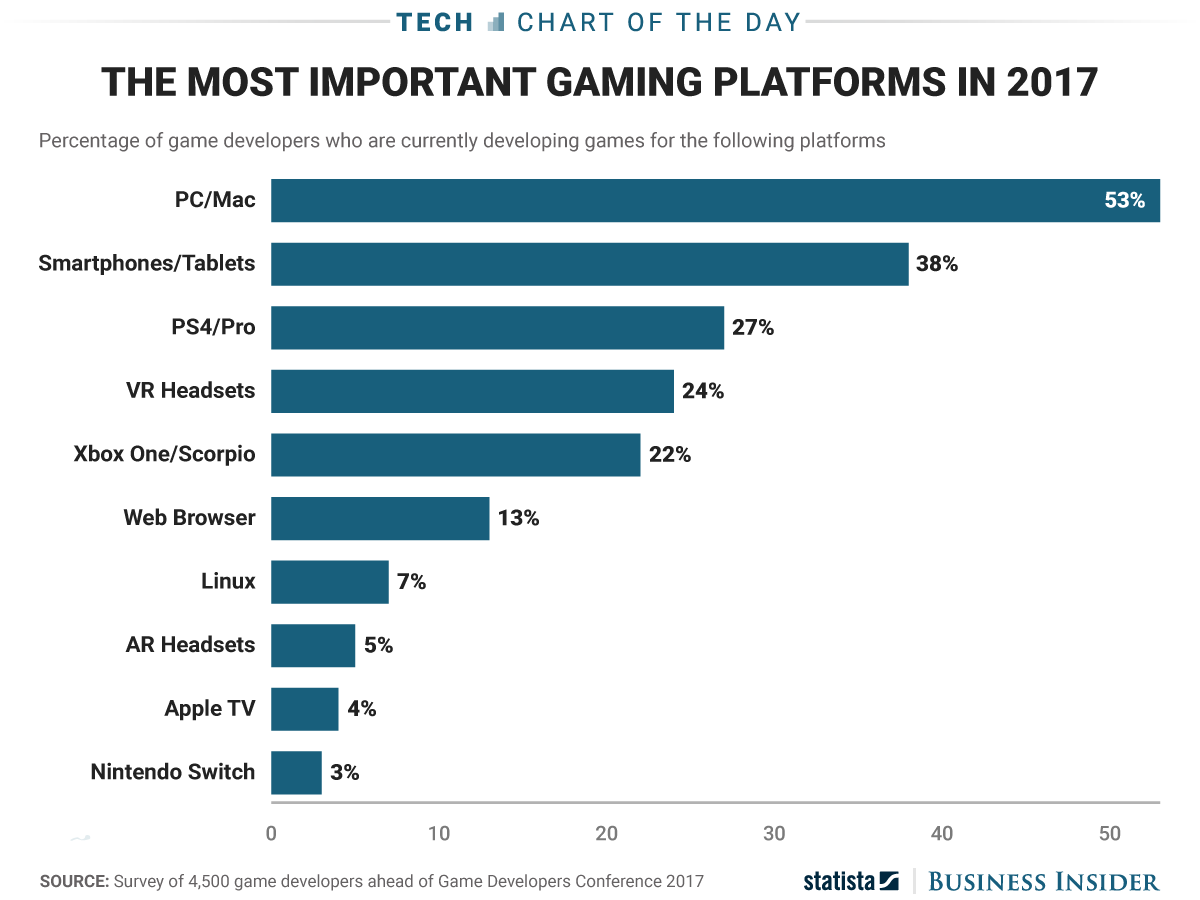
I've found this image here which is made with data from GDC 2017.


Now these questions are pretty generic but if you follow where they lead you you will end up asking yourself questions like the ones below:
  1. Have you decided on the genre of the game? For example helping know what genre of game your title falls under will help you research what platforms provide games with such genre the most. For example Nintendo Switch may introduce more party games than PC does and since NS comes with 2 controllers it's easier for NS owners to quickly band their guests and get a quick game of Mariokart rolling. For PC you'll most likely have to hook up your laptop or PC to your TV and then consider buying gamepads to actually prepare such a setup which lowers the number of people who has such a setup already.
  2. Do you know which platform you'll have the most competition on? This question may help you figure out who you're competing against and whether if you have a chance beating your competition. It can also help you notice if there's a gap in one of the platforms and if there are people thirsty for the type of game you're making.
I'm keeping this post a bit short because it's already getting out of hand and I think maybe it's better to expand on it in the future if I ever do. The TL;DR version of it is as follows: We are preparing Wasco for Android before any other platform after consideration of the aforementioned questions.


I'm back and Wasco dev continues.

Hi everyone,

I had a three month break due to various issues. I see these problems as part of the independent developer as well as the human condition. I'd like to dissect them in a future blog post. On a positive note I'm getting back to developing Wasco and will spend approximately a week updating my roadmap and catching up with other things surrounding the development.

I'll update you again once I do those things and event hough it's optimistic I'll be aiming for weekly posts again.

Tunc

Finally, I'm back to my battle station!

Hi everyone, I'm back home so let's do this!

Last four weeks we've been busy with updating ProDnD Dungeon Generator at the office as that's the project which puts food on the table. On top of everything we've gotten a short assignment in which we assist an eager team of developers plan their development cycle. In a nutshell I've been busy with these at work and several other things I won't be listing here, however, I had the chance of working on some Wasco related material as well.

Since ProDnD & Wasco both are using the same codebase which derived from Pro-D I've imported some of the code I had cleaned while working on Wasco into the ProDnD's project folder. There's nothing like re-using refactored code you've painstakingly cleaned and tested! I'm quite happy about this to be honest. That being said, I've come across an issue with Wasco's sprite packing algorithm during this process. I decided it would be a good idea to fix this issue and improve the codebase on both sides. A two birds with one stone sort of situation if you may. Here's some explanation to what the issue is:


A screenshot of how the algoritm is currently packing the tile textures. 
Can you already tell what's wrong here?

As you can see the textures are packing in an orderly fashion, however, there's a lot of free space and the atlas texture can be way smaller. For this we need to match the atlas's texture size to the volume of sprites we have: I've been thinking of doing this by calculating the initial volume of all sprites and taking the square root of it. Let's say I have 15 x 10 by 10 sprites and 5 x 20 by 20 sprites. That would make a volume of ((15x10x10) + (5x20x20)) = 3500. And square root of 3500 is 59 which makes the best next atlas size 64 by 64. This way instead of getting the above picture where there's a lot of space being wasted, we can get a smaller size atlas texture and save on space and memory if I'm not mistaken. This method is most helpful since compression algoritms provided by Unity and most other engines support powers of two. (More on this later. It's an interesting topic.) 

After this volume calculation happens we need the following flow: A fitting algoritm needs to run through these sprites and pack them tightly all the while making sure it has the best placement option possible. If the sprites won't fit within the current texture size, since the best arrangement doesn't constitue all elements fit within it, then the algoritm will double the size to 128 by 128 and try again. This time surely fitting all and if it didn't then it can double again and again until we crash and burn our computer.

Above an example of
what I'd like to see!

If you're curious yourself as well about how a fitting algoritm should work I've found this article offering a nice solution. Here's me asking for help here at Reddit.

Until the next post!
Tunc

Almost there...

I was unfortunately away from my computer due to a series of family related responsibilities and will be reaching back to my computer very soon.